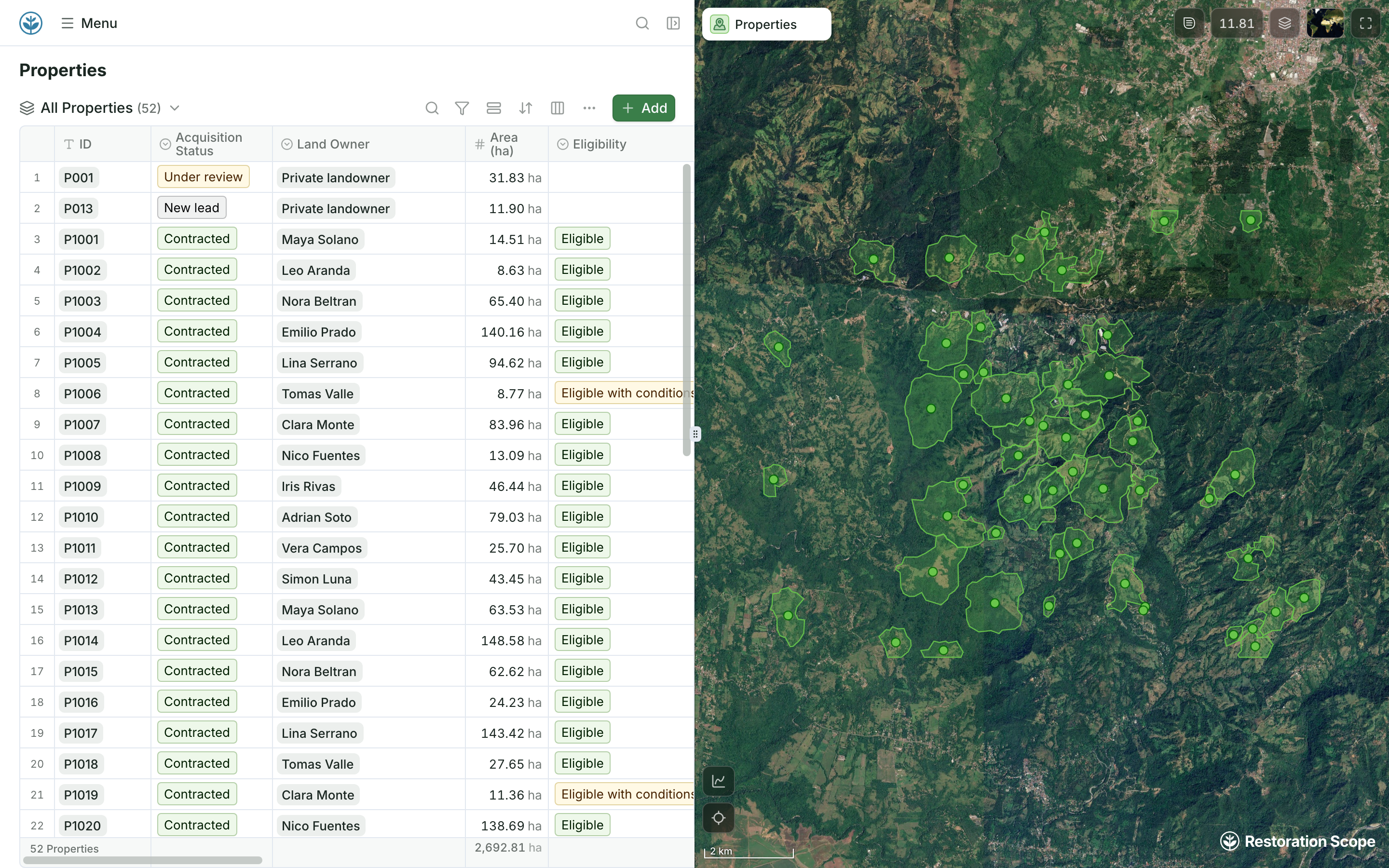
A live project map for the whole team
Records and their boundaries side by side in the browser, the same ones field teams see in the Field App.
QGIS is free, open-source desktop GIS for analysis and mapping. Restoration Scope is not a GIS: it is where field teams, coordinators and funders work from the same sites and records.
 Restoration Scope
They do different jobs, so many teams use both. QGIS is free desktop GIS for an analyst doing analysis, cartography or custom processing. Restoration Scope is not a GIS: it is where field teams, coordinators and funders work from the same sites and records, including people who never open a GIS. Analysis stays in QGIS, and its exported layers reach the rest of the team in Restoration Scope.
 QGIS QGIS | Restoration Scope | |
|---|---|---|
| What it is | Free, open-source desktop GIS (GNU GPL) for Windows, Mac and Linux. | A restoration data platform: a configured field app, linked records, maps and portals. |
| Cost | Free, “forever”, in the project’s own words. | Priced per project after a scoping call. No public price list. |
| Who uses it | GIS users. Analysis and cartography reward training. | Field teams, coordinators and funders, each with their own view. |
| Analysis | A deep analysis toolset with chained processing workflows and plugins. | Geospatial data layers, and project-specific analysis workflows built with our team. |
| Maps | Cartography and a print layout designer for publication-quality maps. | A live project map of sites and records, in the browser and the Field App. |
| Field capture | Desktop software. Field teams pair it with companion apps such as QField. | The Field App works offline: points, lines, polygons and photos. |
| Records over time | Layers and attribute tables you structure and maintain. | Sites, visits and seasons linked as records. |
| Donor reporting | Exported maps and reports, or layers published to the web. | Donor portals built from the same records the team keeps. |
QGISAnalysis stays in QGIS.QGISIts results are exported as layers: Shapefile, GeoJSON, KML, GeoTIFF.Restoration ScopeField teams, coordinators and funders see them with the project records.Layers exported from QGIS (Shapefile, GeoJSON, KML, GeoTIFF) come into Restoration Scope, so analysis stays in QGIS and its results reach the rest of the team.
Checked against QGIS's own pages on October 17, 2026: QGIS, QGIS features.
These are Restoration Scope screens from our demo project and a public donor portal. To see QGIS, visit its own site.
Records and their boundaries side by side in the browser, the same ones field teams see in the Field App.

Each site links its monitoring plots and visits, so its history stays in one place.
QGIS is desktop GIS that works as one part of a network of tools, beside spreadsheets and a field app. Restoration Scope is an adaptable platform that keeps records and maps together and brings your GIS files in as layers.
Where restoration records live, from word of mouth to custom softwareYes. QGIS is free and open source under the GNU GPL, for Windows, Mac and Linux.
No. QGIS is a desktop GIS. Restoration Scope is where the whole team works from the same sites and records, and it takes in layers made in QGIS.
Yes. Shapefile, GeoJSON, KML and KMZ, and GeoTIFF files come in and attach to your sites.
No. Field teams use the Field App and coordinators use the web app. GIS skills help when you bring in or analyse layers.
Restoration Scope publishes this comparison. Something out of date? Write to info@restorationscope.com.
Bring in the spreadsheets, field forms and maps you already use, and see every site in one place.